The Real Cost of Digital Laziness
We’ve built our entire lives on top of fragile passwords.
Most people treat them like they treat dental checkups, ignore it until something hurts. By then, it’s too late.
The numbers are not on your side. Every password you’ve ever created has probably been leaked in some breach you’ve never heard about. It doesn’t matter that the breach was from a forgotten forum you joined in 2012; attackers don’t forget. They run automated “credential stuffing” attacks across every major platform, testing your old passwords against your bank, your email, your cloud storage. One lazy reuse, and they’re in.
The weak link is always human behavior.
We think we’re clever with “Password123!” or by swapping ‘E’ for ‘3’, patterns a brute-force script can guess in milliseconds. We reuse passwords because we tell ourselves, “Nobody would bother hacking me”. That’s wrong. Nobody is hacking you. They’re hacking everybody, at scale, without even knowing who you are.
Security is not paranoia; it’s hygiene.
You wouldn’t leave your apartment door wide open just because you’ve never been robbed. So why leave your digital life exposed? A compromised email account isn’t just a privacy leak, it’s a skeleton key to reset every other account you own.
What works?
- Unique passwords for every account. Non-negotiable.
- Password managers to store them. The “I don’t trust password managers” crowd is already trusting their brain, which is worse.
- Two-factor authentication on critical accounts (email, bank, primary cloud). And no, SMS OTP is not enough.
- Regular breach checks using services like HaveIBeenPwned to see if your credentials have been exposed.
Digital security is boring, until it becomes catastrophic.
The same way seatbelts don’t make you a better driver, strong passwords won’t make you invincible. But they drastically reduce the damage when the inevitable collision happens.
Most hacks aren’t cinematic scenes of hoodie-wearing geniuses bypassing firewalls. They’re just someone logging in with your password, because you gave it to them years ago and never thought twice.
You are either disciplined about security, or you’re gambling with your entire online identity. There’s no middle ground.
A Checklist to Lock Down Your Digital Life
(No motivation speeches. Just do it.)
1. Secure Your Email.
- Your email is the control tower of your digital identity.
- If it’s weak, every “secure” account you own is just one password reset away from theft.
- Set a strong password, enable 2FA, and set recovery settings.
2. Get a Good Password Manager.
- Bitwarden, 1Password, or KeePass.
- Stop using your brain as storage; it’s a terrible database.
- Never write down your passwords in your diary.
3. Enable 2FA.
- Authenticator apps (Aegis, Authy, Google Authenticator) or hardware keys (YubiKey).
- SMS OTP should be the last resort.
- Enable passkeys if the website supports it. Passkeys replace passwords with cryptographic keys tied to your device, making phishing almost impossible.
4. Use Unique Passwords.
- If one account is compromised, it shouldn’t unlock the rest of your life.
- Use password generators like Bitwarden’s password generator.
- Prefer passphrases over passwords.
5. Check for Breaches.
- Use haveibeenpwned.com
- If your password is in a breach, assume it’s public and change it now.
6. Update Your Devices.
- Phone, laptop, browser extensions, outdated software is an open window.
7. Remove Accounts You Don’t Use.
- Old, abandoned accounts are breach magnets. Shut them down.
8. Prevention Best Practices.
- Change passwords when account breached or suspected compromised.
- For high-value accounts like bank, cloud service etc; rotate passwords regularly.
- For banking and other sensitive logins, use a clean browser profile with no extensions, or incognito mode.
- Avoid logging into critical accounts on public or shared computers, they may have keyloggers or malware.
Social Engineering & Phishing Vectors
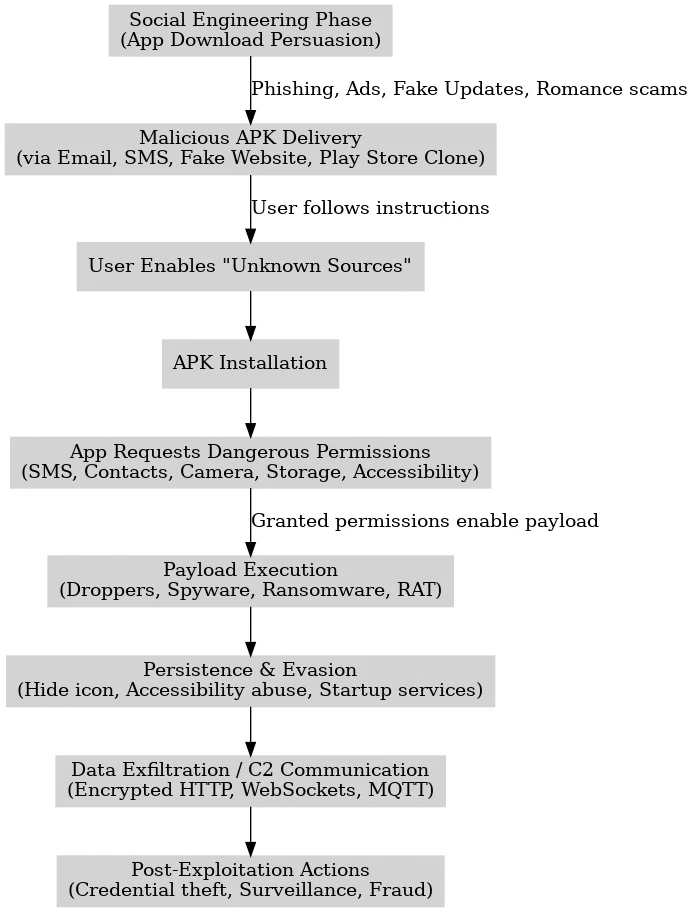
Even the most secure device can be compromised if the attacker convinces you to willingly install or permit malicious code. Common tactics include:
- Fake App Updates: Pop-ups claiming “Your WhatsApp is out of date, download now” that lead to malicious APKs.
- Lookalike Apps: Apps in third-party stores with names and icons mimicking legitimate software.
- Malicious Links: SMS, WhatsApp, or email links that lead to credential phishing sites or drive-by downloads.
- Fake System Alerts: In-browser alerts saying “Your phone is infected” to prompt a bogus cleaner app download.
- Compromised QR Codes: Publicly posted QR codes (cafés, events) that link to APKs or phishing pages instead of expected URLs.
- Public Wi-Fi: The public wi-fi could be setup to decrypt your traffic. It could be an evil-twin access point.
Mitigation:
- Install only from Google Play or trusted app stores.
- Avoid clicking links from unsolicited messages.
- Verify app publisher names and permissions before installing.
- Use a scanner like VirusTotal Mobile to check suspicious APKs before opening.
- Use a trusted VPN (ProtonVPN, MullvadVPN, IVPN). Avoid the VPNs advertised by YouTubers.
- Know that VPNs don’t make you anonymous, they only encrypt your traffic.
- You can host your own VPN with Wireguard, OpenVPN or PI-VPN.
- Avoid all free VPNs at all times. If you’re not paying for the service, your data is the product. The only widely recommended exception is ProtonVPN’s free tier, which is subsidized by paid users and has a transparent privacy policy.
A flowchart of a social engineering attack:
Trusted Tools for Digital Security
(No sponsorships. Just what works.)
Password Managers
- Bitwarden (Free + open-source, cloud sync, self-hostable)
- 1Password (Paid, polished UI, family plans)
- KeePassXC (Free, open-source, offline storage)
2FA / MFA Apps
- Aegis Authenticator (Free, encrypted backups, Android)
- Authy (Cross-device sync, encrypted, consider disabling cloud-sync if you want maximum control.)
- YubiKey (Hardware key, phishing-resistant)
Breach Checkers
- Have I Been Pwned (Email & password leak lookup)
- Firefox Monitor (Automated breach alerts)
Teach yourself
- Techlore’s resources page (Learning Resource)
If you skip these steps, you’re not being “laid-back about security”. You’re just volunteering to be the easy target in a very crowded shooting gallery.