CouchLens is a client-side web application for analyzing Couchbase N1QL query performance. You feed it JSON exports from system:completed_requests, system:indexes, and schema inference results. It parses execution plans, computes metrics, detects inefficiencies, and generates a report showing where your queries are slow.
Everything runs in the browser. No data leaves your machine. The tool is a Progressive Web App, so you can install it and use it offline. The goal is to give database administrators and developers a way to understand query behavior without writing custom scripts or debugging raw JSON.
Why I Built This
I work for an organization that relies heavily on Couchbase. Although my background was primarily in traditional SQL databases (MySQL, MariaDB, PostgreSQL) and occasionally MongoDB, being introduced to Couchbase here was a revelation. I fell in love with the capability of running SQL on JSON via SQL++ (formerly N1QL).
This enthusiasm led me to dive deep into Couchbase’s internals. I constantly read about how the query planner, indexing strategies, cost-based optimizer, and storage engines function. Concepts I explored in What Couchbase Taught Me About System Thinking I built this tool as a way to understand these concepts better and to share my learnings.
You can give it a try at couchlens.lorbic.com .
Looking ahead, I am working on an index generation engine. This engine will look at your document schema and query patterns to suggest covering indexes or identify inefficiencies in existing ones. These features are currently in development and will eventually be integrated into CouchLens.
This post describes what CouchLens does now (version 0.3 alpha), how it works, and what features are planned.
What It Does
CouchLens provides eight main views organized into tabs:
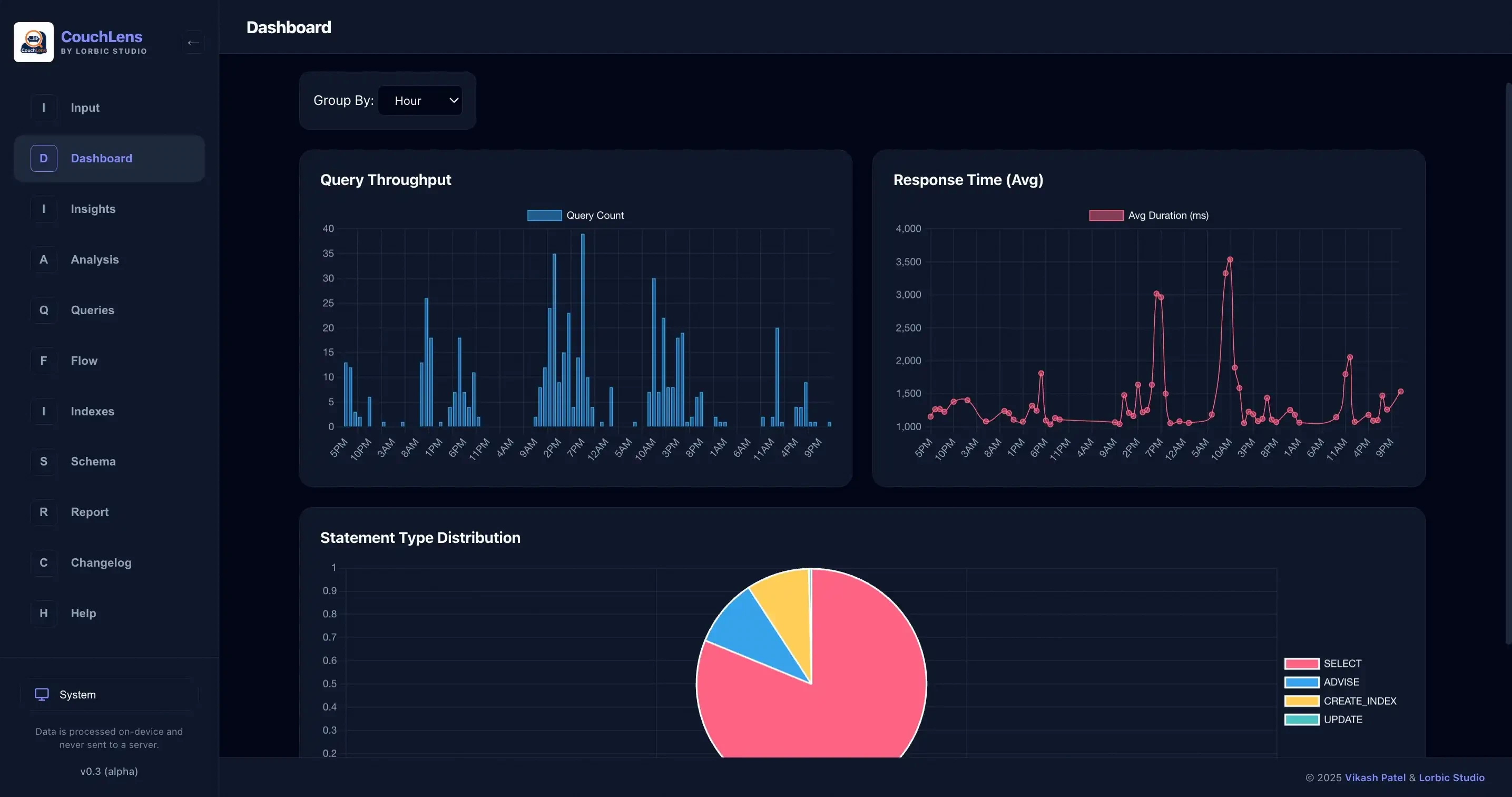
Dashboard
Charts showing query throughput over time, average durations, and statement type distribution. Use this to identify periods of high load or performance degradation.
Insights
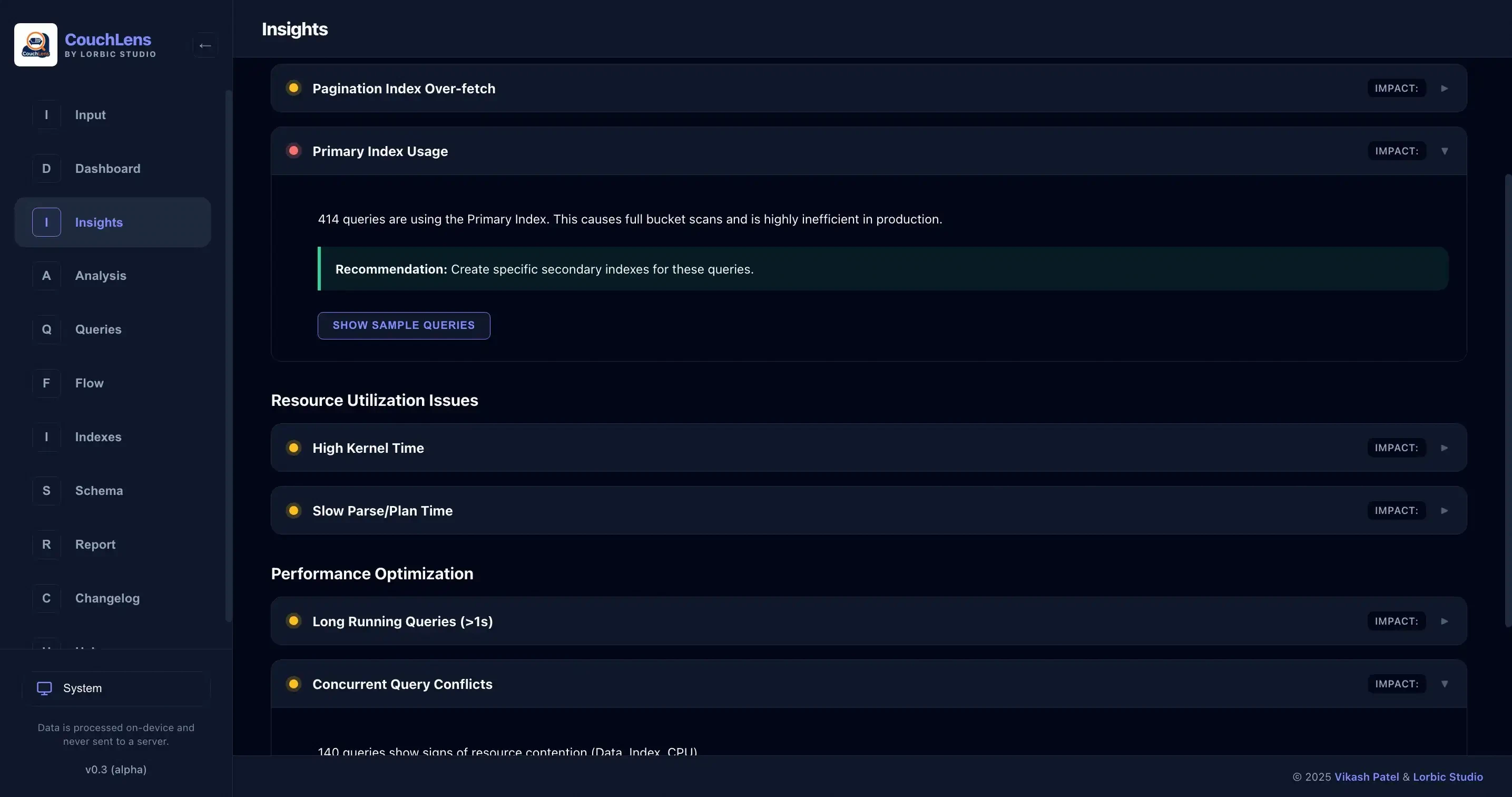
Automated detection of performance issues. The insight engine scans execution plans and flags queries that match 11 predefined patterns:
Index Issues:
- Inefficient index scans (scanned 50k+ rows but returned less than 10%)
- Pagination over-fetch (ORDER BY + LIMIT + OFFSET scanning 10k+ items)
- Primary index usage (full bucket scans)
Pattern Analysis:
- SELECT * usage
- LIKE with leading wildcards
- Missing WHERE clauses
- Slow USE KEYS operations (taking more than 20ms)
Resource Issues:
- High memory usage (more than 10MB per query)
- High kernel time (more than 10ms, indicating OS scheduling pressure)
- Slow parse or plan phases (more than 5ms)
Performance:
- Long-running queries (more than 1 second)
- Large result sets (more than 20MB)
- Concurrent query conflicts (heuristic based on fetch latency, index scan throughput, and kernel time ratio)
Each insight includes affected query counts, severity (critical/warning/info), and recommendations.
Analysis
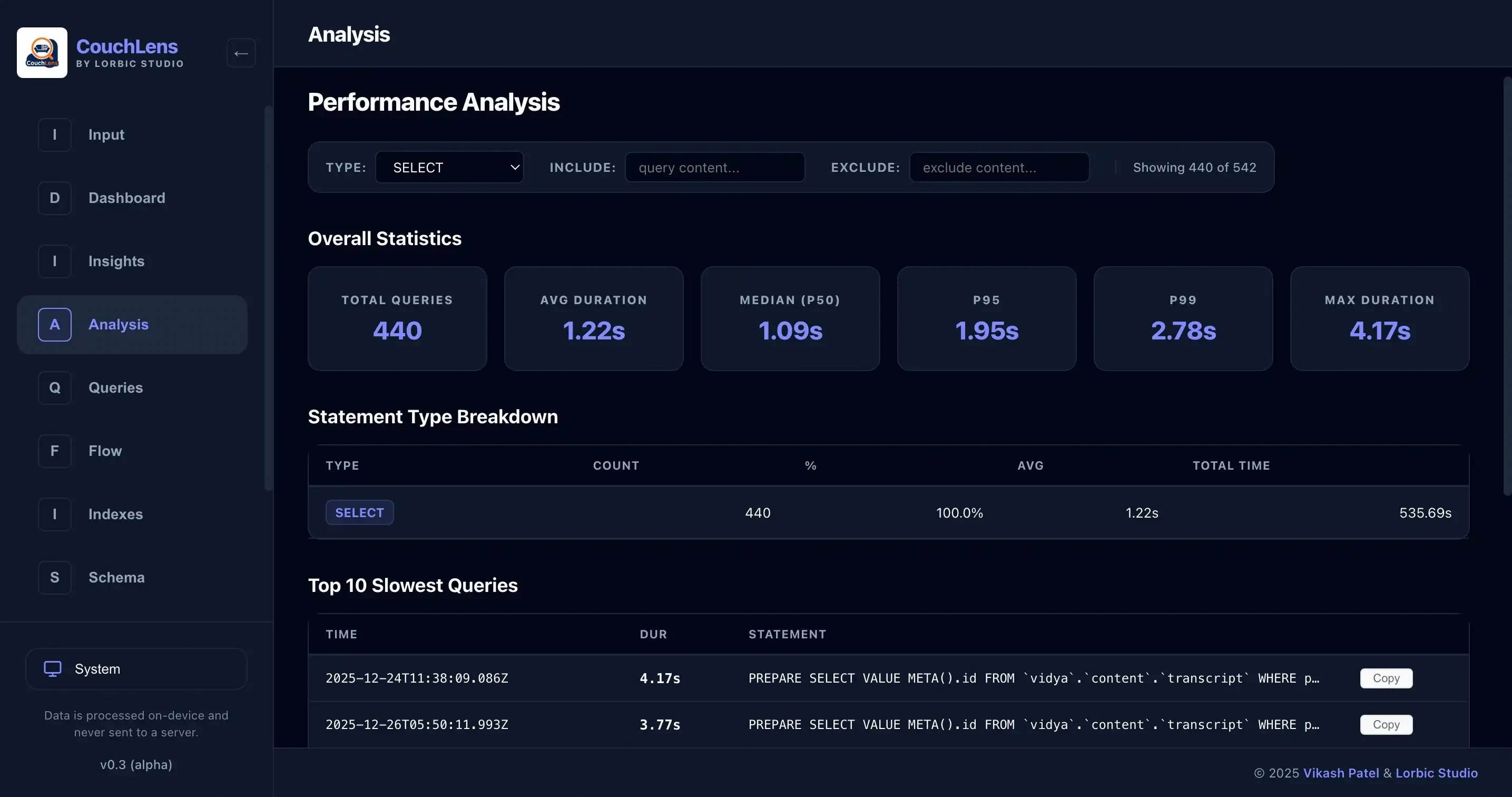
Statistical breakdown of query performance: p50, p95, p99 latencies, min/max/average durations, and performance grouped by statement type (SELECT, INSERT, UPDATE, etc.). Lists the top 10 slowest queries.
Queries
A sortable, searchable table of every query in the dataset. Sort by duration, result count, or payload size. Full-text search to find specific SQL patterns. Case-insensitive filtering.
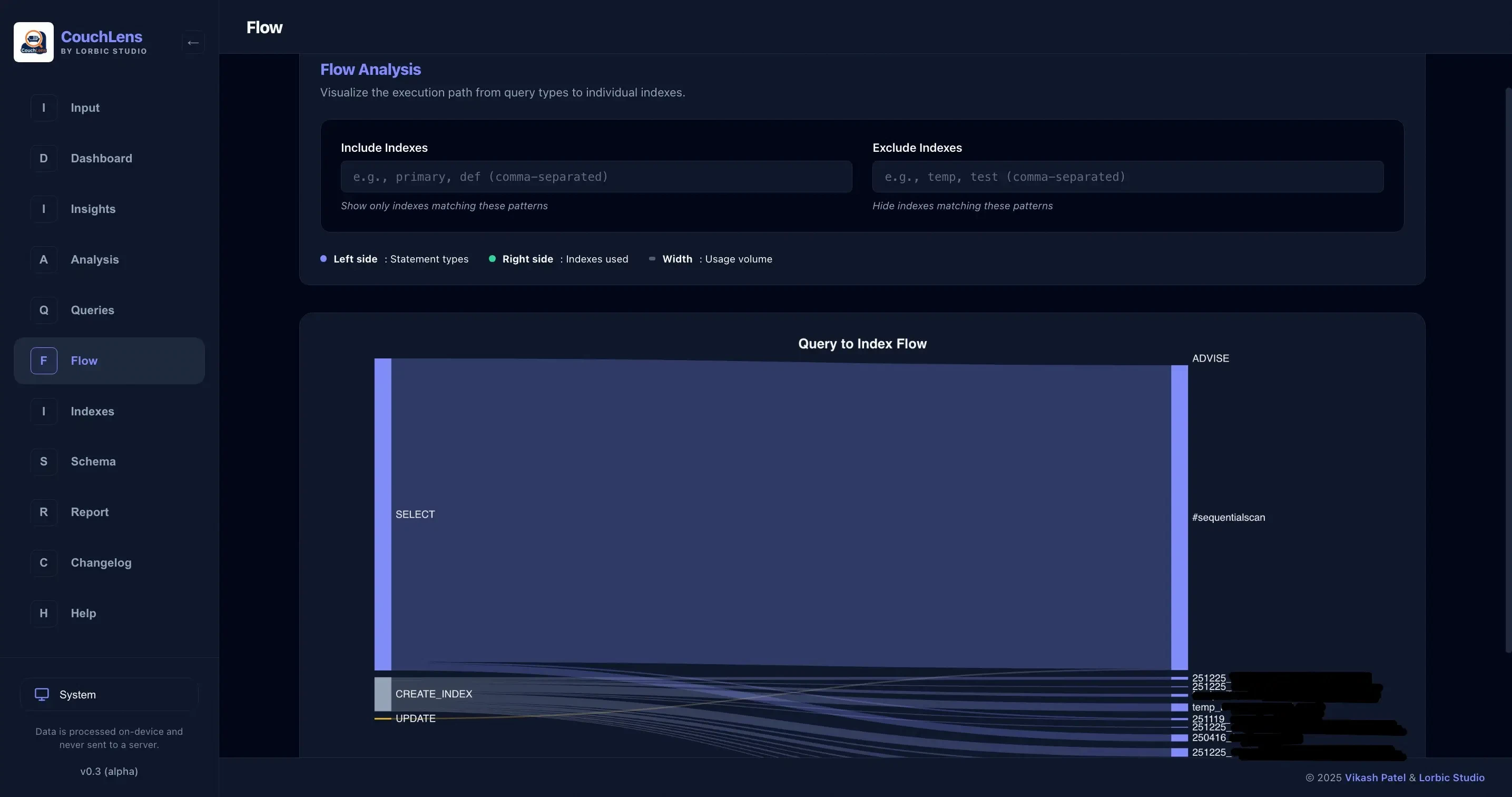
Flow
A Sankey diagram showing which queries use which indexes. Visualizes index usage patterns. Helps identify underutilized indexes or queries hitting primary indexes. Includes text filters to include or exclude specific index names.
Indexes
A filterable table of index definitions with search by name or definition, status badges (online/building/offline), and copy-to-clipboard support.
Schema
Hierarchical view of buckets, scopes, and collections with type analysis for each field. Detects mixed-type fields (where a field is a number in some documents and a string in others) and highlights date/time fields and unique identifiers.
Report
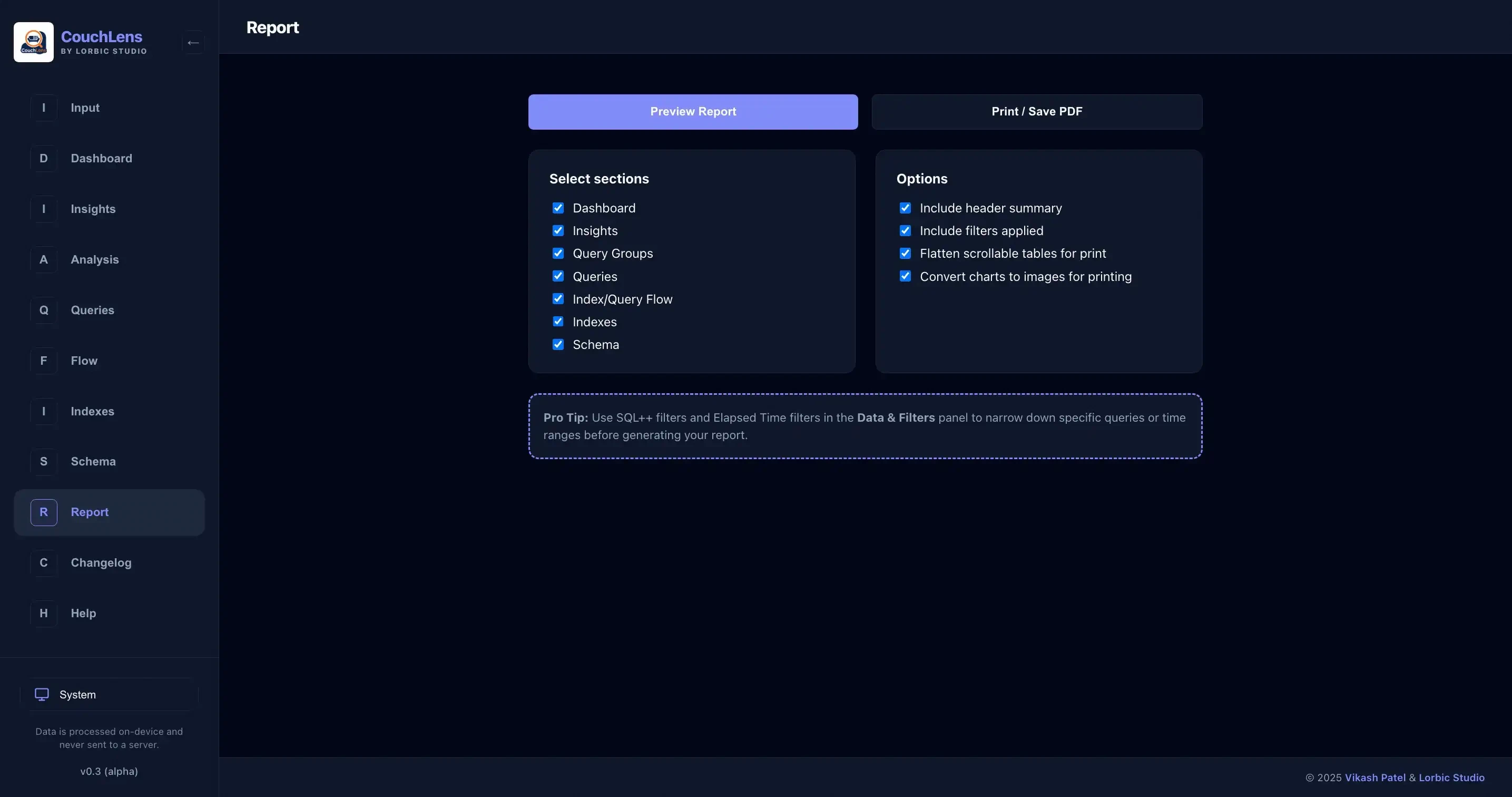
Selectively generate a printable report combining multiple sections (Dashboard, Insights, Analysis, etc.) into a single view. Export to PDF via browser print.
The tool also includes integrated documentation (Getting Started, SQL Queries reference, User Guide, and Changelog) accessible from the Help tab.
How to Use It
Collect Data
Run these queries in Couchbase Query Workbench:
1-- Completed Requests
2SELECT *, meta().plan
3FROM system:completed_requests; 1-- Indexes
2SELECT
3 s.name,
4 s.id,
5 s.metadata,
6 s.state,
7 s.num_replica,
8CONCAT("CREATE INDEX ", s.name, " ON ", k, ks, p, w, ";") AS indexString
9FROM system:indexes AS s
10LET bid = CONCAT("", s.bucket_id, ""),
11 sid = CONCAT("", s.scope_id, ""),
12 kid = CONCAT("", s.keyspace_id, ""),
13 k = NVL2(bid, CONCAT2(".", bid, sid, kid), kid),
14 ks = CASE WHEN s.is_primary THEN "" ELSE "(" || CONCAT2(",", s.index_key) || ")" END,
15 w = CASE WHEN s.condition IS NOT NULL THEN " WHERE " || REPLACE(s.condition, '"', "'") ELSE "" END,
16 p = CASE WHEN s.`partition` IS NOT NULL THEN " PARTITION BY " || s.`partition` ELSE "" END;1-- Schema (per collection)
2INFER `bucket`.`scope`.`collection` WITH {"sample_size": 10000};Export each result as JSON.
Load Data
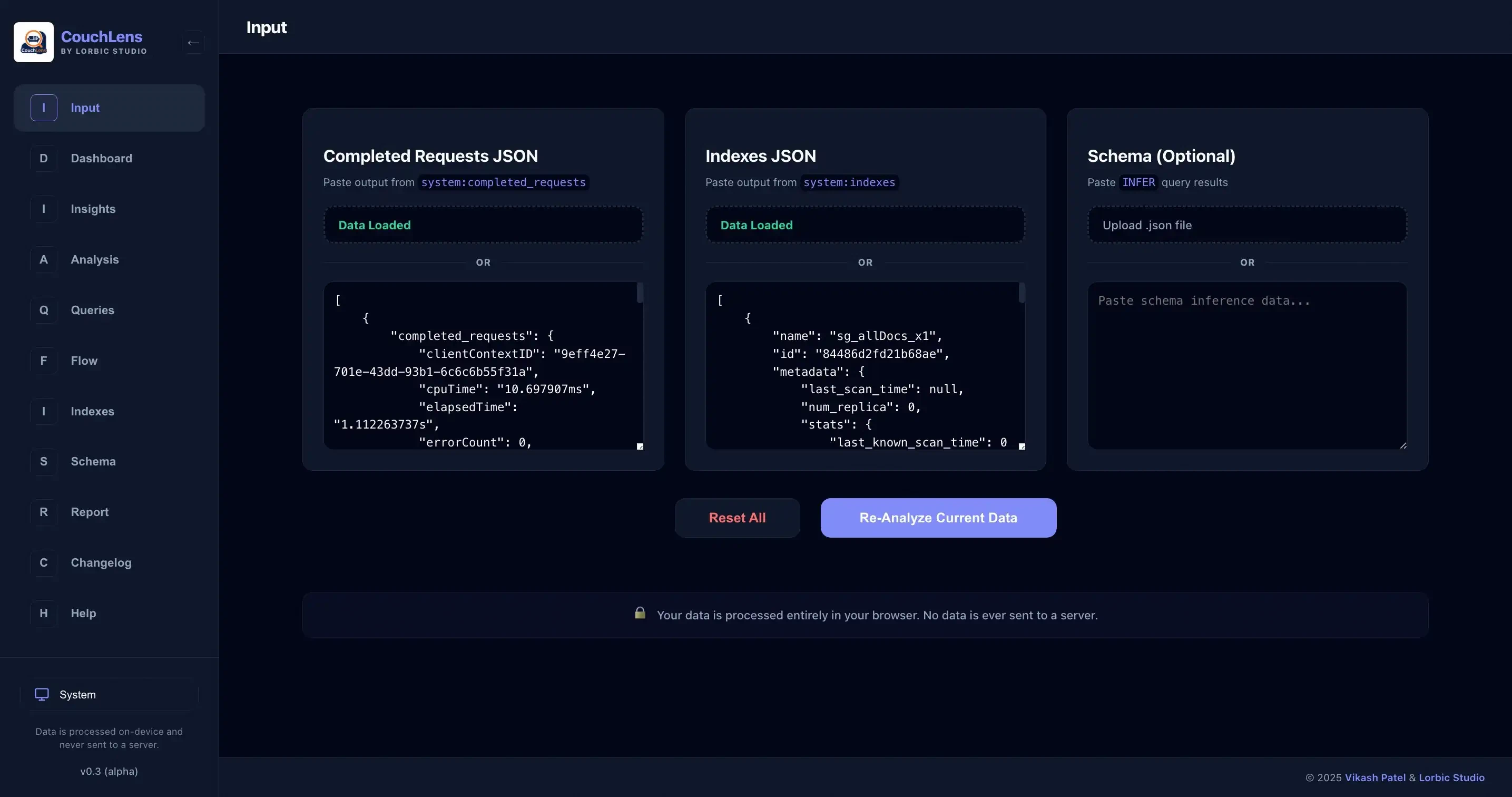
Open CouchLens. Navigate to the Input tab. Upload the JSON files or paste JSON directly. Click Analyze. Parsing typically completes in under a second for 10,000 queries.
Explore
Navigate through tabs to review metrics, insights, schema, and individual queries. Use insights to prioritize optimization work. Generate reports for documentation or sharing.
Design Decisions
CouchLens uses Svelte 5 and TypeScript. Svelte provides reactive state management with a small runtime. TypeScript ensures type safety during data transformations. All parsing and analysis runs client-side in the browser’s JavaScript runtime.
The tool does not connect to Couchbase directly. This avoids security concerns and deployment complexity. You export data once and analyze locally. For continuous monitoring, collect new exports periodically.
Charts use Chart.js with zooming and panning enabled. The flow diagram uses a custom Sankey implementation. The insight engine is rule-based. Each insight category has thresholds and pattern matchers defined in src/lib/insights.ts. Thresholds are currently hardcoded but tunable by editing the source.
The app is a Progressive Web App. Once installed, it works offline. The service worker caches assets for fast loading.
Current Limitations
CouchLens is version 0.3 alpha. Known limitations:
- No Historical Tracking: Each analysis session is independent. Tracking performance over time requires manual export and comparison.
- No Auto-Refresh: You must manually re-export and re-upload data to see new queries.
- Fixed Thresholds: Insight thresholds are hardcoded. Different workloads may need different definitions of “slow” or “inefficient”.
- Limited Correlation: The tool does not correlate queries with external events (deployments, traffic spikes, configuration changes).
- No Background Monitoring: There is no alerting when new issues appear.
Roadmap
Future versions will focus on making CouchLens more useful for ongoing performance work. These plans are not committed and may change based on my availability and requirement.
Planned Features
Index Recommendations
A rule-based recommendation engine that suggests specific indexes for queries scanning too many rows or using primary indexes. The engine will parse query predicates and suggest covering indexes or compound indexes based on filter patterns.
Custom Thresholds
User-configurable thresholds for each insight category. Allow users to define what “slow” or “inefficient” means for their workload.
Query Profiling Wizard
A guided workflow that takes a slow query, generates explanations of execution plan phases, and suggests specific optimizations (add index, rewrite WHERE clause, use covering index, etc.).
Historical Comparison
Store past analysis results (in browser local storage or exported files) and compare performance across time periods. Show which queries degraded, improved, or appeared/disappeared.
Direct Couchbase Integration (Optional)
An optional mode that connects directly to Couchbase and pulls fresh data on demand. For users who prefer live data over manual exports. This would be opt-in.
Alerting
Background checks that notify when p99 latency crosses thresholds or when new inefficient queries appear in fresh datasets.
Export Reports to File
Generate standalone HTML or PDF reports summarizing insights and metrics for sharing or archiving.
Priority will be given to index recommendations and custom thresholds as these directly address current pain points.
Operational Cost
Right now CouchLens runs entirely in the browser. There is no backend to maintain, no database to configure, no infrastructure to deploy.
The queries you run against system:completed_requests and system:indexes do have a cost on the Couchbase cluster. system:completed_requests is bounded by the completed-threshold setting (default 1000 queries). Fetching this data is a single query. system:indexes typically contains hundreds of indexes, not thousands, so fetching is cheap. Schema inference with INFER samples documents and can be expensive on large collections. Use sample_size to control cost.
Once you have JSON exports, analysis completes in under a second for 10,000 queries on a modern browser.
Comparison to Other Tools
Couchbase provides the Query Workbench, which shows EXPLAIN and PROFILE for individual queries. The Couchbase Server UI shows cluster-level metrics. CouchLens fits between these tools. It provides batch analysis across many queries and automates pattern detection that would otherwise require manual inspection of each query.
For real-time monitoring with dashboards and alerting, use Prometheus, Grafana, and the Couchbase exporter. CouchLens is for ad-hoc analysis and optimization work, not 24/7 monitoring. Although it can become one in future.
For application-level tracing (tracking queries from application code through to database execution), integrate OpenTelemetry or a similar distributed tracing framework. CouchLens focuses only on the database layer.
Technical Details
The codebase structure:
 1src/
 2├── components/       # Svelte UI components (dashboard, insights, etc.)
 3├── lib/
 4│   ├── parsing.ts    # Query log parsing, execution plan extraction
 5│   ├── insights.ts   # Insight detection rules and thresholds
 6│   ├── schema.ts     # Schema type analysis
 7│   ├── aggregation.ts # Data aggregation for charts
 8│   ├── types.ts      # TypeScript type definitions
 9│   └── stores.ts     # Svelte reactive state stores
10└── App.svelte        # Main application with routing
Parsing logic in lib/parsing.ts extracts fields from system:completed_requests, computes derived metrics (elapsed time in milliseconds, statement type, indexes used), and normalizes timestamps. Insight detection in lib/insights.ts scans the parsed dataset and returns structured results with affected query IDs, severity, and recommendations.
Chart aggregation in lib/aggregation.ts groups queries by time intervals (minute, hour, day) and computes throughput and average durations per bucket. Schema analysis in lib/schema.ts recursively walks the INFER output and detects type inconsistencies and special field types (dates, UUIDs, etc.).
Conclusion
CouchLens is a tool for parsing Couchbase query logs and finding inefficiencies. It runs in the browser, requires no backend, and works offline. It automates detection of common performance issues and provides a structured way to explore query behavior across large datasets.
The tool is not a replacement for EXPLAIN or PROFILE. It is a complement. Use CouchLens to find which queries need investigation, then use EXPLAIN and PROFILE to diagnose the specific problem and validate fixes.
Future versions will add index recommendations, customizable thresholds, and historical tracking.
If you manage Couchbase clusters and spend time optimizing N1QL queries, try CouchLens. Load your query logs and see what it finds.
Further readings: